Team Hub
LiveYour team. One app. Any phone. Jobs, rotas, checklists, reports, training and documents, set up around the way your business works.
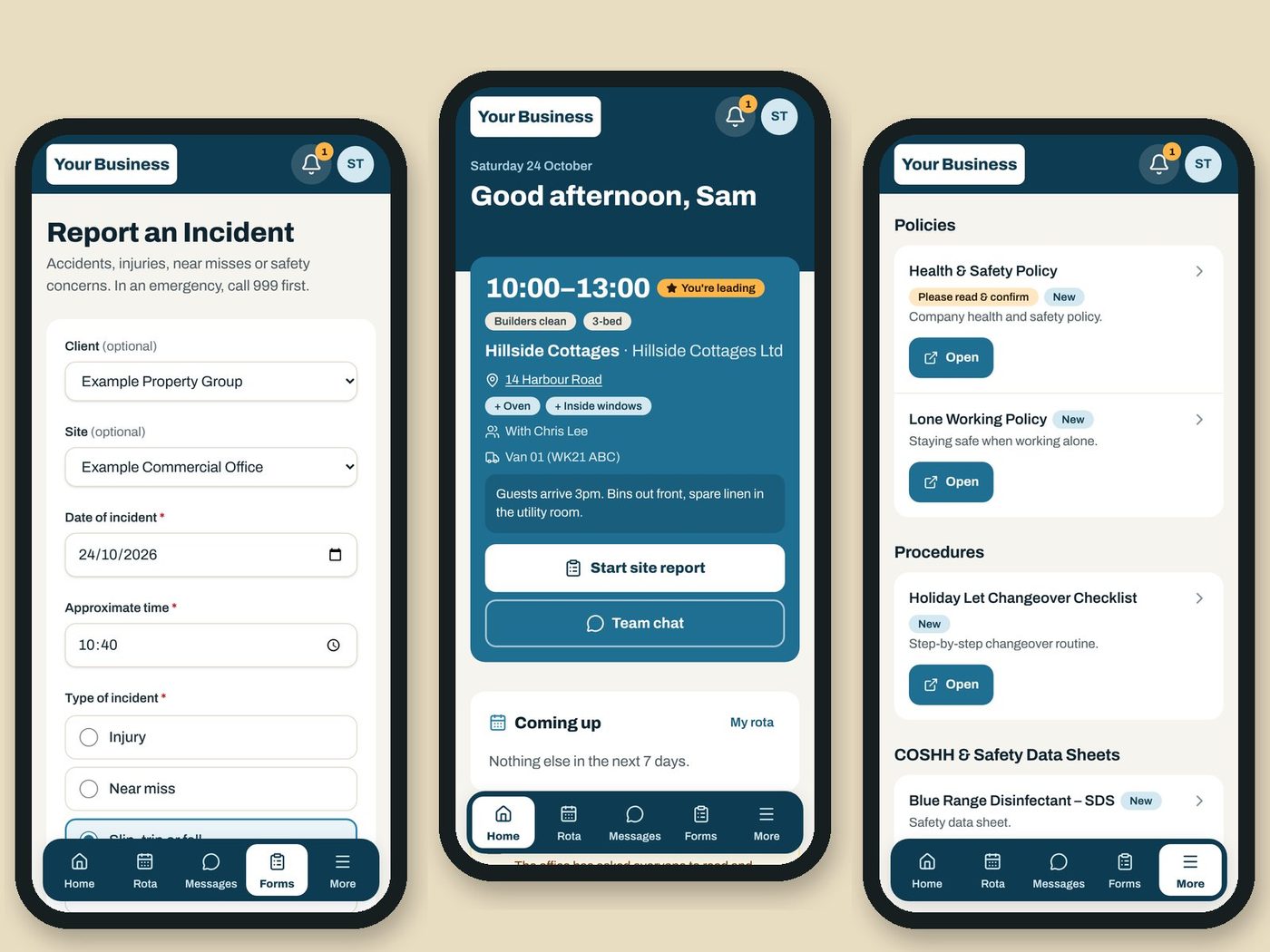
WhatsApp groups. Paper checklists. Lost certificates. Sound familiar?
Most small teams run on a group chat, a folder nobody can find and a manager answering the same questions all day. Team Hub puts all of it in one app your staff open on their phones, and gives managers one screen that shows what needs attention today.
It's live with Dorset Cleaning, where the whole team runs their day from it. Every business I set it up for gets its own version: your logo and colours, your forms, your sites and your people.
How it works
You tell me how your team works. I set up your hub, build your forms, add your staff and load your documents. Your team gets a link, logs in and adds it to their home screen like an app. If there are parts you don't need yet, like the rota or messages, they can be switched off and turned on later. When something needs changing, you message me and it's done.
Your data stays yours
Every hub is locked down with role-based access, so staff only ever see what they need. Every change is recorded in an audit log, there's no public sign-up, and you choose who gets in.
Built in Dorset, for Dorset businesses
No call centres, and no software built for big chains. Just a local person who'll set it up with you and pick up the phone.
Everything Team Hub does
Switch on what you need. Each area can be turned off for staff and turned back on when you're ready.
Rota and jobs
Everything for the shift, on one screen.
- Repeating and one-off jobs, filled 12 weeks ahead
- Teams with a lead, vans or vehicles, and notes for the team
- Week view by person, site or vehicle, plus a day view
- Warnings for double bookings, short-staffed jobs and vehicles off the road
- Publish the rota and everyone affected is notified
- Job types with standard lengths and extras
- Contracted hours, and hours for payroll as a CSV
- Key safe and alarm codes staff only see on the day of the job
- One-off bookings with the customer's address and an emailed booking confirmation
- Copy last week's one-off jobs in one go
Staff app
- Today's shifts on the home screen with address, map link, team, vehicle and notes
- A morning reminder on days they're working
- Holiday and appointment requests
- Quick actions for the forms they use most
- Installs on a phone like an app, with your branding
- Works on any phone, tablet or computer
Forms and reports
Checklists and reports done on the spot, not on a soggy clipboard.
- A form builder for any form your business needs
- Site reports with photos and signatures
- Opening, closing, changeover and inspection checklists
- Saves on the phone if the signal drops
- Vehicle, equipment and incident reports
- Date, time, signature and photo questions
- Branded PDF reports for clients, and report packs for a date range
- Missing reports: jobs with no report, and a button to remind the team
- Insights: monthly totals by client, site and person
- CSV export of any report
Issues
- Every vehicle, equipment or incident report becomes an issue
- Status, priority and who's dealing with it
- Mark a vehicle off the road or equipment faulty in one tap
- A timeline of everything that happened
- The person who reported it sees how it was resolved
Messages and alerts
- A team chat on every job
- Group chats and direct messages to the office, with photos
- Staff can't message each other privately
- Send an alert to everyone, a role, a group or chosen people
- Phone notifications, with email for anyone without them
- Each person chooses which alerts reach their phone
Training
Training done between jobs.
- Training modules with text, video and linked documents
- Multiple-choice quizzes with a pass mark
- Assign by role, with deadlines and refreshers
- New starters get their training automatically
- A progress board of everyone and every module
- Reminders when training is due or overdue
Updates and documents
Policies your team actually reads.
- Company news with "I've read and understood"
- See who has and hasn't confirmed
- A searchable library of policies, guides and safety sheets
- Linked to your Microsoft 365 and OneDrive files
- Mark a document as updated and staff are asked to confirm again
- Documents that only supervisors or managers can see
People and compliance
No more lost certificates.
- Four roles: staff, supervisor, manager and administrator
- DBS, right to work and certificates with expiry dates
- Reminders 30 days before a check expires
- Clients with contacts, sites and their own report history
- Vehicles and equipment, with their issues
- An audit log of who changed what, and when
For managers
- A Today page: rota problems, missing reports, issues, time off and expiring checks in one place
- Live system status and an error log
- Show or hide whole areas from staff
On the way
- Holiday allowances On the way
- Area teams for businesses with more than one patch On the way
Your name on it. Your checklists in it.
- Pubs, bars and cafésOpening and closing checks, fridge and cellar temperature logs, allergen and licensing training, and the accident book on every phone.
- Cleaning companiesWhere it started. Rotas, site reports with photos, client PDFs and access codes on the day.
- Landlords and letting agentsGas, EICR and EPC expiry alerts, repair reports with photos, inspection checklists and logins for your contractors.
- Holiday lets and guesthousesChangeover checklists, damage reports with photos, notes for each property and rotas for your cleaners.
- Trades and garagesVan checks, kit tracking, job photos and certificates.
- Events and festivalsCrew briefings, inductions, sign-in and incident logs.
- Kennels and groomersFeeding logs, cleaning rotas and staff training.
- Clubs and securityDBS, first aid and licence expiry tracking.
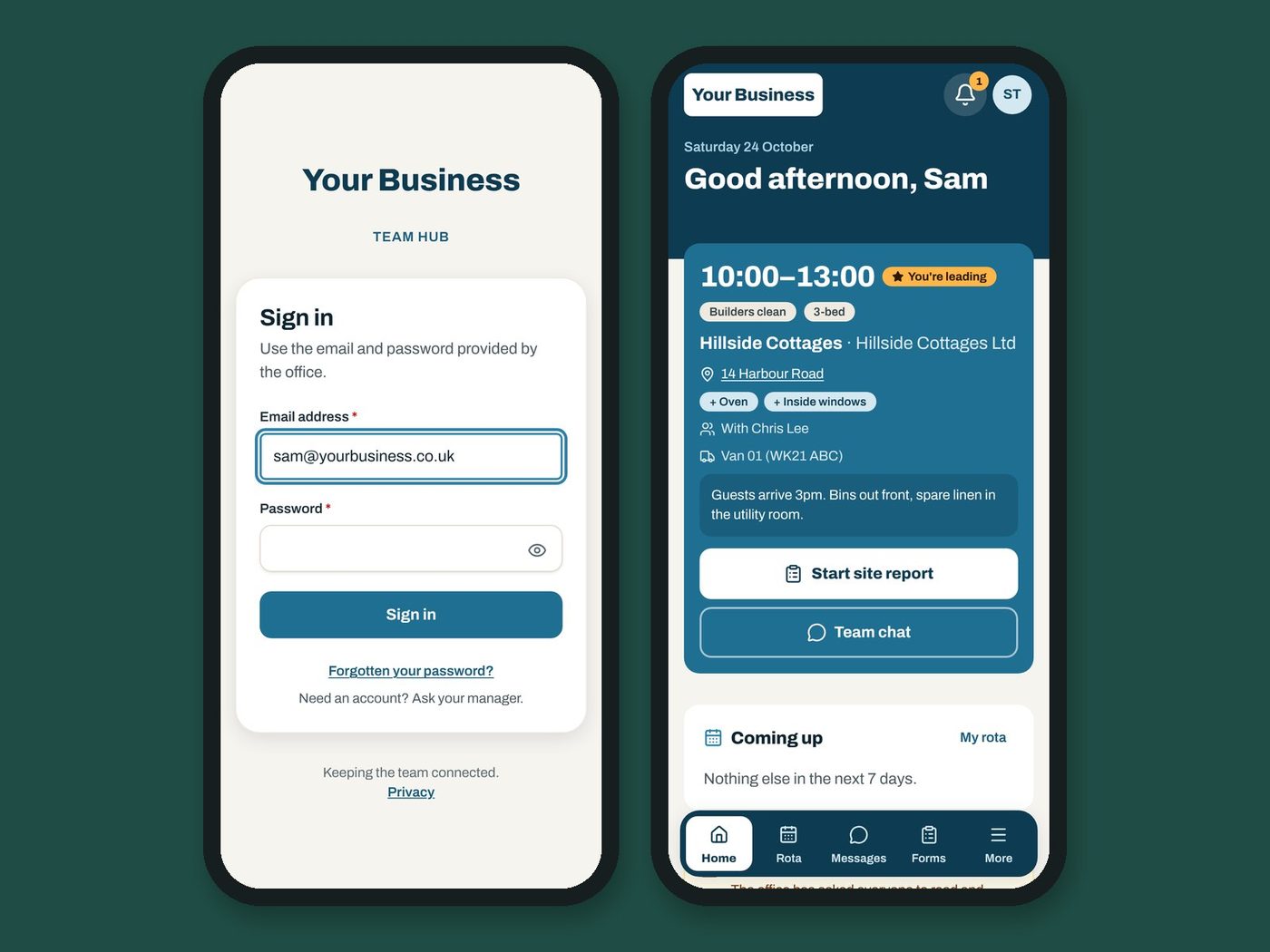
Book a Team Hub demo
Tell me how your team works and I'll show you Team Hub set up with your own forms, sites and branding.